Can not flash firmware

Oded

Well-known member
Likes
889
Location
Israel
Got a new BCU for my EX. Installed it, and tried to flash the firmware with the Multitool.
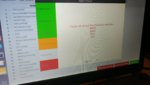
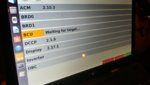
Ran into a problen, in which the bike can not finish the installation because it does not recognize certain components.
I am attaching photos of the error windows.

Any ideas?
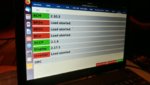
20190903_201346.jpg

20190903_201228.jpg
 
Unzip the firmware.zip file and extract the contents (.aebin files) to some directory. Then use the loader tab in MT, click Open, then navigate to the .aebin file associated with the component. This will allow you to target specific firmware individually for the microcontroller.
 
Still getting "waiting for target" for a long time. Seems like the BCU is unidentified, or something.

20190903_205837.jpg
 
Turn the key to the off position, wait for the blue blinking lights ontop of the battery to stop blinking, then turn key back on.
 
Still same problem.
Is there a specific order of components we should flash? Because we are waiting for a long time and it is still "waiting for target"
 
The "Update Firmware" process loads the firmware in the order you see the modules displayed in the loader tab, top to bottom. That said, in my experience there seems to be some dependencies across modules, but I've only really experienced that when fooling around with various module versions that aren't apart of the same firmware package.

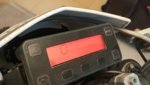
Do you have any blinking lights on the dash?

Try disconnecting the low voltage plug on the top left side of the battery for about 10-15 minutes and then plug it back in. On the A pack it's the black screw-on connected behind the left side shroud.
 
Will do that, thanks.
It looks like the new BCU is a vanilla board with no fw at all.
Perhaps we are trying to update a non existing firmware instead of installing the BCU's fw from scratch.
Looks like the BCU have no version at all flashed on it.

The blue lights are blinking on the board when bike is on.
This is what shows on the display -

20190903_185311.jpg
 
Your bike might be stuck in a state that is preventing new firmware from being loaded. I've had this happen to me a few times in my experimenting. In all cases, disconnecting the low voltage plug for 15+ minutes resolved the stuck state and allowed firmware to be loaded after that.
 
Oh noes. Well I would recommend first flashing the BCU and BRDs first individually. Since you went through the automated process it thought you needed the inverter which means re-flashing that as well. You should be able to get the FW files for the BRDs and BCUs.

But why are you flashing the BRDs?
 
Bottom line - bike works great!

After a lot of head scratching, I noticed the the connector (ACM to battery pack) was not well connected.
Re-attached it and all work well (no need to flash anything).

I apologize for the fake alarm, and thank everyone for their big help.
 
Bottom line - bike works great!

After a lot of head scratching, I noticed the the connector (ACM to battery pack) was not well connected.
Re-attached it and all work well (no need to flash anything).

I apologize for the fake alarm, and thank everyone for their big help.

That'll do it! (y)
 
Bottom line - bike works great!

After a lot of head scratching, I noticed the the connector (ACM to battery pack) was not well connected.
Re-attached it and all work well (no need to flash anything).

I apologize for the fake alarm, and thank everyone for their big help.
Good news!! Happy trails now!
 
Bottom line - bike works great!

After a lot of head scratching, I noticed the the connector (ACM to battery pack) was not well connected.
Re-attached it and all work well (no need to flash anything).

I apologize for the fake alarm, and thank everyone for their big help.

Yay! Very glad that the bike is running again!
 
Back
Top