Solved GPS navigation disappearing when the Stark VARG dashboard takes over

#MI

New member
Likes
3
Location
Estonia
If you try to use GPS navigation apps on the Stark VARG, the map disappears as soon as the dashboard screen takes over. This makes it near impossible (or at least tedious) to use GPS navigation apps other than the Stark official PRO subscription that gives access to Trail, Navigation, Tracks.

After some success with workarounds like split screen (link) or disabling the Stark app foreground (link), which kind of work but are not very reliable, I stumbled upon something interesting. When you set Google Maps to navigate, it appears as a Picture-in-Picture window on top of the Stark dashboard. But as with the other workarounds it comes with some limitations:
  • It only works with turn-by-turn navigation. You can't just see a map or follow your own GPX trail
  • If you tap the Google Maps PiP window to full screen, you get stuck in Google Maps and lose access to the Stark dashboard until you turn off the bike or restart the phone.
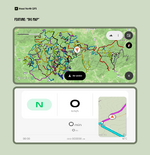
As none of it was ideal, I ended up building a dedicated app optimized for Stark VARG leveraging Picture-in-Picture that runs the map with a GPS trail on top of the Stark VARG dashboard. You can load your GPS trail (GPX), run it as a tile on top of the Stark dashboard (or use a plain map without a route), navigate complicated sections with the full screen map, and toggle between them. Right now it uses Mapbox maps, which are the same as what Stark uses in their app.


I named it Head North GPS. There are more details on how it works here headnorthgps.com and it's also available on the Google Play Store (link).

All ideas and comments are welcome. If there is interest I'll keep building it.
 
I'll try recording a track tomorrow but for now when I load my gpx file(9mb 282 tracks) it's shown as such: I can load bigger files but with fewer tracks and it displays correctly. If you want take a look at the file and let me know what I might be able to do. Thanks. Link to GPX file
View attachment 16131
ah! I see whats happening. Right now I've been building it around one continuous track per gpx file (like the one you get from stark app history). Your gpx is a perfect example of the direction I've been thinking about - a “ski map” with multiple routes in one file. I'll build it out in the next few days. Great find!

PS! What do you use to create the gpx? Would be useful to see what kind of features or metadata might make sense to support beyond just colors and separate segments.
 
ah! I see whats happening. Right now I've been building it around one continuous track per gpx file (like the one you get from stark app history). Your gpx is a perfect example of the direction I've been thinking about - a “ski map” with multiple routes in one file. I'll build it out in the next few days. Great find!

PS! What do you use to create the gpx? Would be useful to see what kind of features or metadata might make sense to support beyond just colors and separate

The file was recorded over years on a Trail Tech Voyager Pro. I edit with various programs that I have including Trail Tech's old Rideleader program. I use Caltopo to import and work with the files. Also, now I remember having the same issue when I imported files into the Stark app I guess because it is also Mapbox. Thanks for looking.
 
That's a great app thanks ! I would love to have Waze in picture too, did anyone tried that ?
Thanks! Waze doesn’t support Picture in Picture unfortunately. Google Maps is the only alternative I’ve found so far. To get Google Maps to trigger PiP you need to start navigation and then exit the app using the Android home button (the circle) before the Stark app takes over. I’ll post a proper guide a bit later.

How are you using Waze with the Stark? Turn-by-turn navigation or for the alerts?
 
I'm using Waze mainly for cops and radar/alerts, I can make it work by disabling bluetooth but I can't see the battery unfortunately..
 
Back
Top